What Happens When You Type a Website URL in Your Browser?
We do this every day without thinking much about it.
You open your browser, type a website name like google.com, and press Enter.
Within seconds, the website appears on your screen.
But behind this simple action, many things happen silently and very fast.
Let’s understand this step by step — in simple words, without technical confusion.
Step 1: You Type the URL
A URL (like www.example.com) is basically the address of a website.
When you press Enter, your browser understands:
- You are requesting information
- You want to connect to a specific website
At this point, nothing is loaded yet.
The browser is just getting ready to find that website.
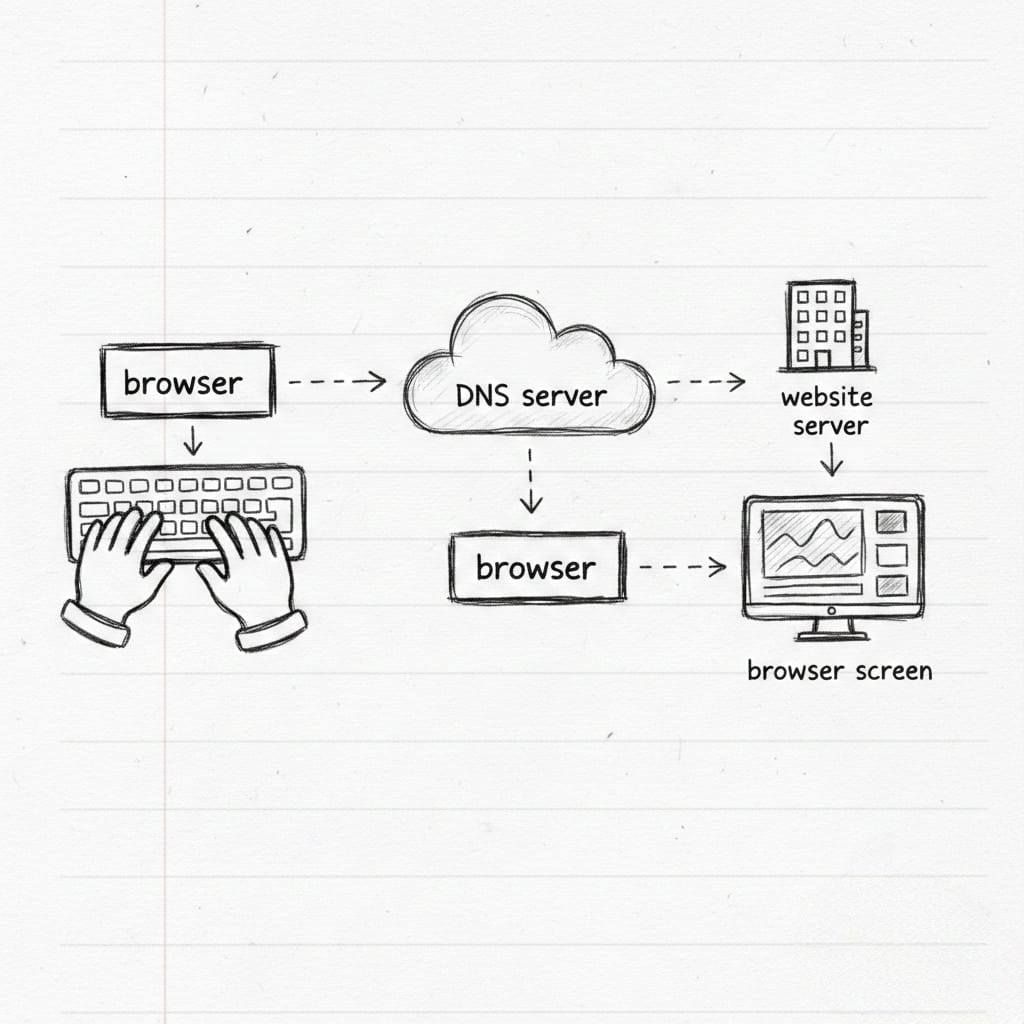
Step 2: Browser Looks for the Website’s Real Address (DNS)
Computers don’t understand website names.
They understand IP addresses (numbers like 142.250.190.14).
So your browser asks a question:
“What is the IP address of this website?”
This request goes to something called DNS (Domain Name System).
You can think of DNS as:
- The internet’s phonebook
- Website name → Phone number (IP address)
Once the IP address is found, the browser knows where the website lives.
Step 3: Browser Connects to the Website Server
Now that the browser knows the IP address, it sends a request to the server.
This request basically says:
“Hey, a user wants to see your website. Please send the data.”
This happens through the internet using secure communication rules.
If the website uses HTTPS, the connection is encrypted for safety.
Step 4: Server Processes Your Request
The server receives your request and starts working.
Depending on the website:
- It may fetch data from a database
- It may check login status
- It may run backend code
- It may prepare content specially for you
For example:
- A news site loads latest articles
- A profile page loads user details
- An e-commerce site loads products
The server then prepares a response.
Step 5: Server Sends Files Back to Your Browser
The server sends back files like:
- HTML (structure of the page)
- CSS (design and layout)
- JavaScript (interactions and logic)
- Images and fonts
All these files travel back to your browser in small packets of data.
This all happens in milliseconds.
Step 6: Browser Builds the Website on Your Screen
Now your browser starts working hard.
It:
- Reads HTML to understand page structure
- Applies CSS to style the page
- Runs JavaScript to add interactivity
- Loads images and other resources
Slowly (or very fast), the website appears on your screen.
This process is called rendering.
Step 7: Page Becomes Interactive
Once everything is loaded:
- Buttons become clickable
- Forms become usable
- Videos can play
- Scrolling becomes smooth
At this point, the website is fully ready for you.
And all of this started with just one press of the Enter key.
Why Does Sometimes a Website Load Slowly?
Several reasons can affect speed:
- Slow internet connection
- Busy or overloaded server
- Heavy images or scripts
- Distance between you and the server
That’s why optimization is important for developers.
Why This Process Matters
Understanding this flow helps:
- Beginners learn how the internet works
- Developers debug problems
- Website owners improve performance
- Users appreciate the technology behind simple actions
The internet may feel simple on the surface,
but it is built on smart systems working together.
Final Thoughts
Next time you type a website URL and press Enter,
remember that:
- Your browser searched the internet
- Found the correct server
- Requested data
- Built a complete page for you
All in seconds.
This silent process is one of the most powerful things humans have built.